
One-touch activation
A single large, easy-to-find button starts a safety session. The activation path is kept as short as reasonably possible, because seconds matter and menus don't help under stress.
Home / Features
Every capability below serves the same core workflow: get recording fast, keep the recording safe, and be able to find it again when it matters.
A single large, easy-to-find button starts a safety session. The activation path is kept as short as reasonably possible, because seconds matter and menus don't help under stress.
Start a session hands-free using a spoken phrase such as “iWatch On.” The system is being designed so that activation phrases can eventually be customised to suit the user.
Front-facing camera capture, with audio where legally permitted. Each recording carries time and date association, is attached securely to your account, and is protected against accidental deletion.
Sometimes video isn't appropriate, safe or practical. Audio Only gives you the same session flow and the same secure upload, without the camera.
When a recording ends, upload begins automatically. Encryption in transit, visible progress, server confirmation, and retry and recovery if the connection drops part-way through.
A private record of your safety sessions: date, time, recording type, duration, upload status, file name and optional notes — all in one place.
A highly visible 911 button, with plain-language explanation of exactly what it does and any confirmation step your phone's operating system requires before a call is placed.
Account authentication plus a 4-digit PIN for fast authorised access. Device biometrics such as Face ID and Touch ID, account recovery, verification and optional multi-factor authentication are part of the security design.
A secure area for your driver's licence or state ID, insurance information, vehicle information, emergency information, and other important documents you may need to produce quickly.
iWatch is being built for both major mobile platforms, and this website is designed to work on iPhone, Android, tablets, laptops and desktop computers.
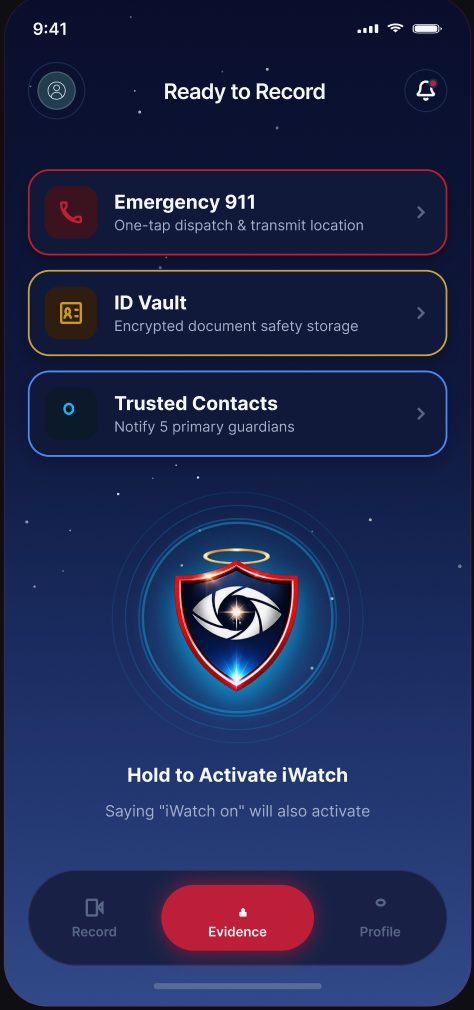
The dashboard
The iWatch dashboard is deliberately uncluttered and optimised for use under stress. These are the primary controls.
| Control | What it does |
|---|---|
| Activate iWatch | Starts a safety session immediately. |
| Video Mode | Begins a session using the camera, with audio where legally permitted. |
| Audio Mode | Begins an audio-only session. |
| Emergency | Brings up the 911 emergency option, with a clear explanation of what happens next. |
| Evidence Vault | Opens your private record of completed safety sessions. |
| My Documents | Opens your secure document area for ID, insurance and emergency information. |
| Profile | Your account, contact details and personal information. |
| Settings | Activation preferences, security options and app configuration. |
Accessibility
An emergency tool that only works for confident users in good light isn't an emergency tool. Accessibility is a requirement of the iWatch design, not an afterthought.
Some capabilities described on this site — including customisable activation phrases, biometric sign-in options and optional location metadata — are part of the iWatch product plan and may arrive after the first release. We would rather tell you what's planned than imply it already exists.
Video and audio recording laws differ by state and country, including rules about recording other people without their consent. You are responsible for complying with the laws that apply where you are. See our Recording & Legal Notice.
Coming soon
Join the launch list and we'll email you the moment the iWatch app is available on the App Store and Google Play.
iWatch is a personal-safety and evidence-documentation technology platform. iWatch does not guarantee the prevention of crime, injury, assault or other emergencies and is not a replacement for emergency services. Recording and privacy laws differ by jurisdiction, and users are responsible for complying with the laws that apply to them. In an emergency, contact 911 or the appropriate local emergency service whenever it is safe and possible to do so.