
Encrypted in transit
Recordings are transferred over encrypted connections. The website and all iWatch services are served over HTTPS.
Home / Evidence Security
Recordings, identity documents and account data are treated as sensitive from the moment they exist. This page explains, in plain language, how iWatch is designed to protect them.
Recordings are transferred over encrypted connections. The website and all iWatch services are served over HTTPS.
iWatch does not tell you a recording is secured until the server has confirmed the upload actually completed. Until then it stays clearly marked as uploading or waiting.
If the connection drops, the upload retries and resumes rather than starting over or silently failing. Progress stays visible to you throughout.
Evidence is never exposed through predictable public URLs. Access requires authentication against your own account.
Files are held in secure object storage with unique evidence identifiers, integrity checks where appropriate, backups and documented recovery procedures.
Administrators manage accounts, support requests and system health. Administrative access does not automatically extend to the contents of private recordings.
What's inside a vault entry
Each completed safety session appears in your private vault with the details you would need to identify it later.
Location information is not attached to sessions today. If it is added in a future version, it will only ever be attached with your explicit permission.
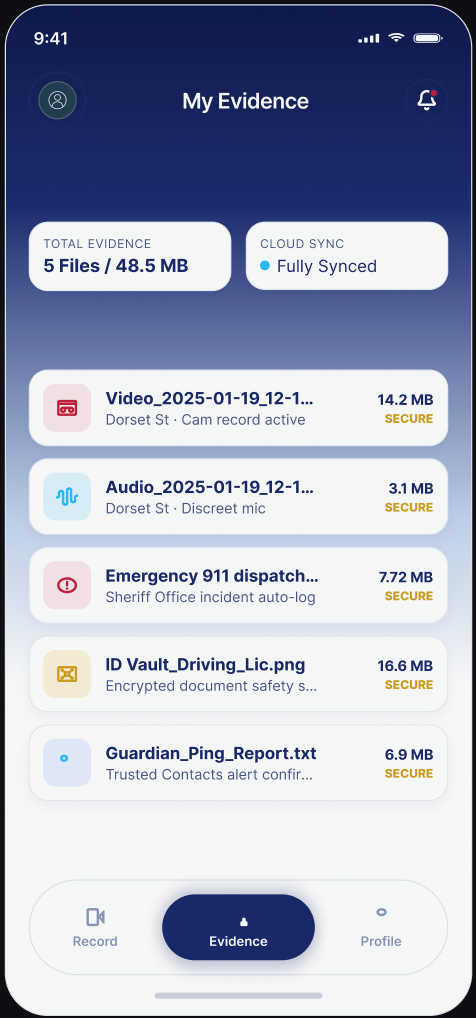
Your identity documents deserve the same care as your recordings, so the same principles apply to the secure document area.
Analytics
iWatch tracks normal website metrics — things like how many people visited a page. Invasive third-party tracking is not used inside private evidence or document areas.
No system can promise that data will never be lost, never be compelled by lawful process, and never be deleted. iWatch will not make those claims. What we will do is tell you accurately what state your evidence is in, protect it with current security practice, and be straightforward with you when something goes wrong.
Coming soon
Join the launch list and we'll email you the moment the iWatch app is available on the App Store and Google Play.
iWatch is a personal-safety and evidence-documentation technology platform. iWatch does not guarantee the prevention of crime, injury, assault or other emergencies and is not a replacement for emergency services. Recording and privacy laws differ by jurisdiction, and users are responsible for complying with the laws that apply to them. In an emergency, contact 911 or the appropriate local emergency service whenever it is safe and possible to do so.